Built by a working Salesforce developer
Practice the Apex that PD1 and interviews test.
Write real Apex and get every drill checked automatically. Start in your browser, then move to your own free Salesforce Developer org for SOQL, triggers, tests and async Apex.
Try a drill now Create a free account
About 5 minutes to start. No Salesforce org needed for your first drill. The drills in Apex basics and Classes & objects are free to run.
Ready for SOQL, triggers and tests? Apex Path, the paid plan, starts with 7 days free for first-time members.
- A code editor, not multiple choice. You write the Apex yourself.
- Your own Developer org. Your tests run on the real platform, not a simulator.
- Checked on every submit. You see more than a pass or a fail.
- Two modules are free. Apex basics and Classes & objects.
Why practice here
The brief beside your code
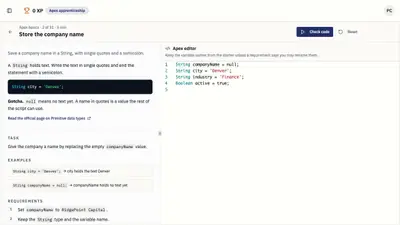
Each drill opens in a code editor with the task on one side and your code on the other. No installs. No sample projects to clone.
The checks, listed
The drill tells you which check failed.
See what you have practiced
Your progress shows what you have passed, module by module.
How it works
- Try your first drill. Complete a short Apex exercise in your browser.
- Connect a practice org. Use a free Salesforce Developer org for exercises that run in Salesforce. Production orgs are blocked.
- Practice and track progress. Submit solutions, review automatic results, and work through the topics.
Modules, in order
Start with the free Apex basics and Classes & objects. Later modules cover SOQL, DML, triggers, unit tests and async Apex.
A growing library of Apex drills in 9 modules. The first two modules are free. Apex Path is the paid plan. It unlocks every module after the two free ones. It costs $19 a month. First-time members get the first 7 days free.
- Apex basics (beginner, free). Variables, numbers, text, dates, if and switch, loops, Lists, Sets and Maps. Your Apex foundation.
- Classes & objects (beginner, free). Classes, constructors, methods, access modifiers, exceptions and enums.
- SOQL queries (intermediate). SOQL and SOSL: filters, bind variables, relationships, aggregates, date literals and safe dynamic queries.
- DML operations (intermediate). Insert, update, upsert and delete, Database methods, save results, savepoints and bulk-safe DML.
- Unit testing (intermediate). Apex test classes that fail when the code is wrong: assertions, test data, mocks and callout mocks.
- Triggers (intermediate). Before and after triggers, handler classes, bulk patterns, recursion guards and roll-ups.
- Asynchronous Apex (advanced). Future methods, Queueable, Batch and Schedulable Apex.
- Debugging (intermediate). Fix real production bugs: queries and DML in loops, null checks, recursion, mixed DML, empty tests and batch state.
- Security & deployment (advanced). Governor limits, security and the habits that survive a production deploy.
Learn from every failed check.
When a check fails, the drill shows what it expected and what your code gave instead. Miss the same check twice and a hint opens up, so you are not left guessing.
Practice exams plus Apex drills
Studying for Admin, Admin II, Platform Developer I, Platform Developer II, or Agentforce Specialist? Work through a Salesforce practice exam, then write the matching Apex on the drills.
Questions people ask
What is ApexSensei?
ApexSensei is a practice site for Salesforce Apex, for people preparing for PD1 or a developer interview. You work through a growing library of short drills in 9 modules, from your first variable to triggers, tests and async Apex. Most drills run in your own free Salesforce Developer org, so you practice on the real platform.
Is ApexSensei free?
Yes, to start. The drills in Apex basics and Classes & objects are free to check and run. Every other drill is free to read. Apex Path adds Check and Run on the other 7 modules for $19 a month.
Do I need a Salesforce org?
Not at first. Your first drills run right in the browser. Later drills run in a free Salesforce Developer org, which you connect once. You can sign up for one at developer.salesforce.com.
Can ApexSensei touch my company's production org?
No. ApexSensei blocks production orgs. Connect a Developer org that you use only for practice.
How is ApexSensei different from Trailhead?
Trailhead teaches the platform with modules and quizzes. ApexSensei is where you practice. You write the Apex yourself, run it in your org, and every drill is checked automatically. Many people use both: learn a topic on Trailhead, then drill it here.
How long does a drill take?
Between 5 and 25 minutes. Most take about 15.
Who built ApexSensei?
We built ApexSensei so you can practice Apex in a real Developer org, not just read about it. The drills are written by a Salesforce developer and the author of Learning Apex and Learning LWC.
Start your first Apex drill today.
Your first drill runs in the browser. No credit card.