CSS and styling
Each component gets its own CSS file. Shadow DOM keeps styles from leaking. Use :host to style the outer element and CSS custom properties to share design tokens.
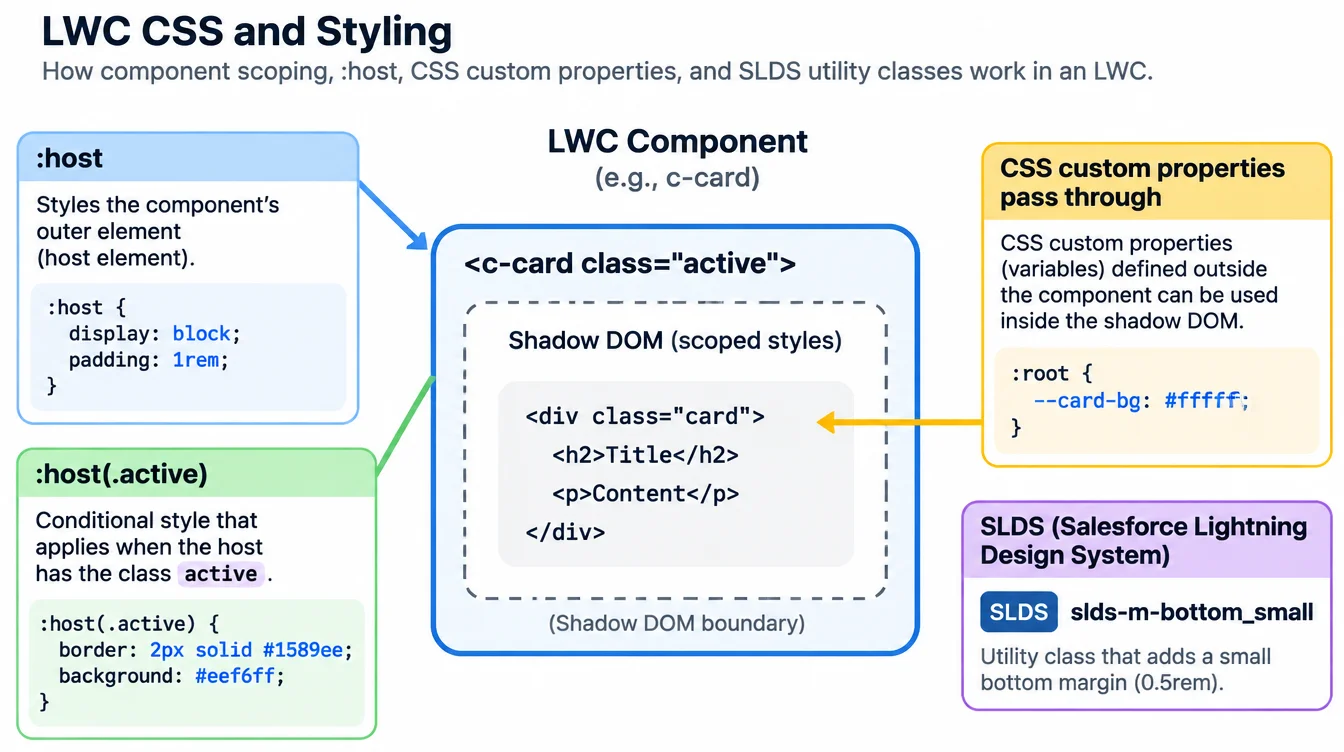
Shadow DOM isolation
Each component's CSS file is scoped to that component. A .title rule in one component never touches .title in another. The browser enforces this through shadow DOM.
Parent styles do not reach into a child. If the parent sets p { color: red }, paragraphs inside a child component stay unaffected.
:host and CSS custom properties
Use :host to style the component's own outer element. :host(.active) applies only when the parent adds that class. :host has lower specificity than an outside rule, which is the intended behavior.
CSS custom properties (variables) cross the shadow boundary. Define --brand-color at a higher level and read it with var(--brand-color) inside any child. This is how SLDS design tokens work.
SLDS utility classes
Salesforce Lightning Design System classes like slds-m-bottom_small and slds-grid are available inside Lightning pages. Use them for spacing, alignment, and layout instead of writing custom CSS for common patterns.
Import SLDS static resource only in standalone apps outside Lightning Experience. Inside an org, the framework loads SLDS automatically.
Example
css
/* statusBadge.css */
:host {
  display: inline-block;
  padding: 0.25rem 0.75rem;
  border-radius: 1rem;
  background: var(--slds-c-badge-color-background, #f3f3f3);
  font-size: 0.75rem;
}

:host(.success) {
  background: var(--slds-c-badge-success-color-background, #2e844a);
  color: white;
}