Wire service
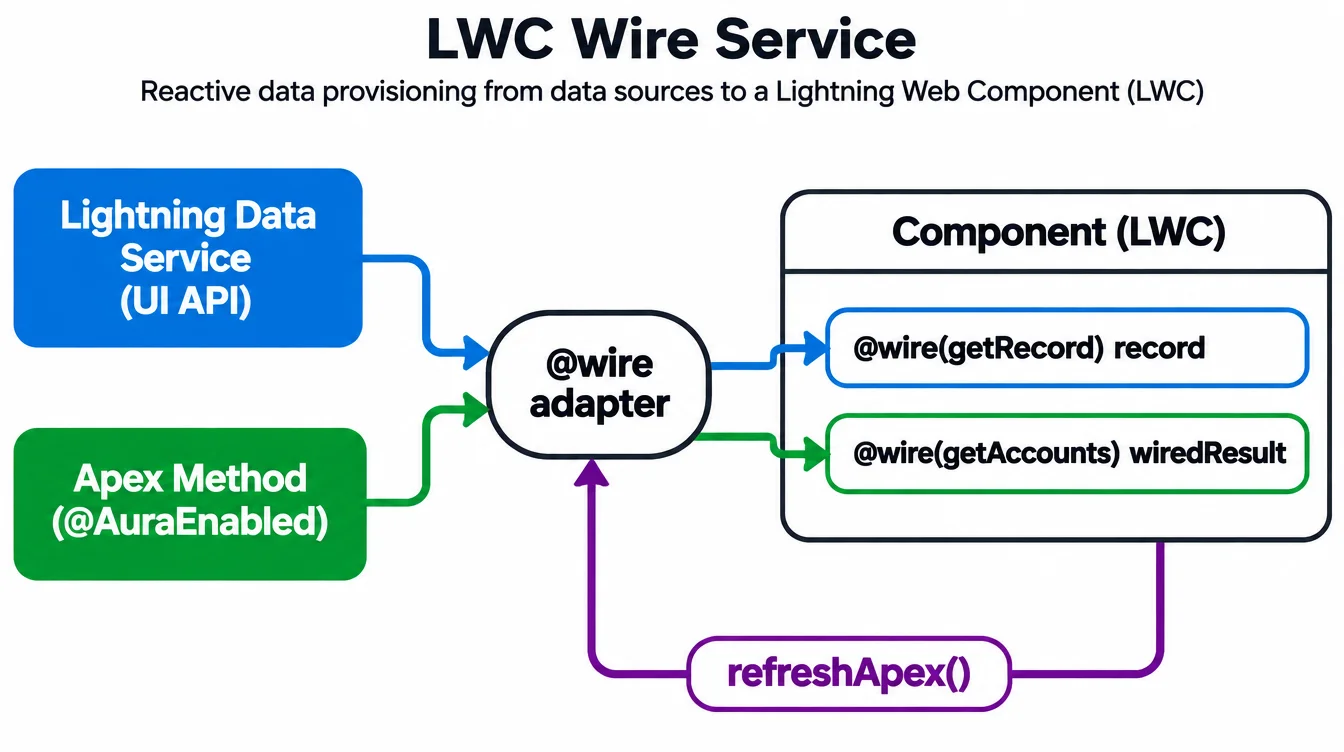
The wire service connects a component to Salesforce data. Wire an Apex method or a UI API adapter, and the framework keeps the data in sync.
Wire to a property
Decorate a property: @wire(getRecord, { recordId: '$recordId', fields: FIELDS }) record;. The $ prefix makes recordId reactive — when it changes, the wire re-fetches.
The property receives an object with data and error. Check both: if (this.record.data) for success, if (this.record.error) for failure.
Wire to a function
Decorate a function instead when you need to transform the result before the template sees it. The function receives { data, error } and you store whatever the template needs.
@wire(getAccounts) wiredAccounts({ data, error }) { if (data) this.accounts = data.map(a => ({ ...a, label: a.Name })); } — the template reads this.accounts.
Imperative calls and refreshApex
When you need data on a button click, not on load, call the Apex method imperatively instead: import getAccounts from '@salesforce/apex/Ctrl.getAccounts'; const result = await getAccounts({ industry: 'Tech' });.
After a DML operation, the wire cache is stale. Call refreshApex(this.wiredResult) to re-fetch. Pass the original wired value, not a copy.
Example
javascript
import { LightningElement, wire } from 'lwc';
import getAccounts from '@salesforce/apex/AccountController.getAccounts';
import { refreshApex } from '@salesforce/apex';

export default class AccountList extends LightningElement {
  wiredResult;

  @wire(getAccounts)
  wiredAccounts(result) {
    this.wiredResult = result; // keep for refreshApex
    if (result.data) this.accounts = result.data;
  }

  async handleRefresh() {
    await refreshApex(this.wiredResult);
  }
}